WhatsApp Automation for Salons in Malaysia: A How-To
Your WhatsApp fills up while your hands are full. Here's how to set up automation that answers from your own price list, sends your booking page and hands the tricky chats to your team, in five steps.
In this guide6 sections
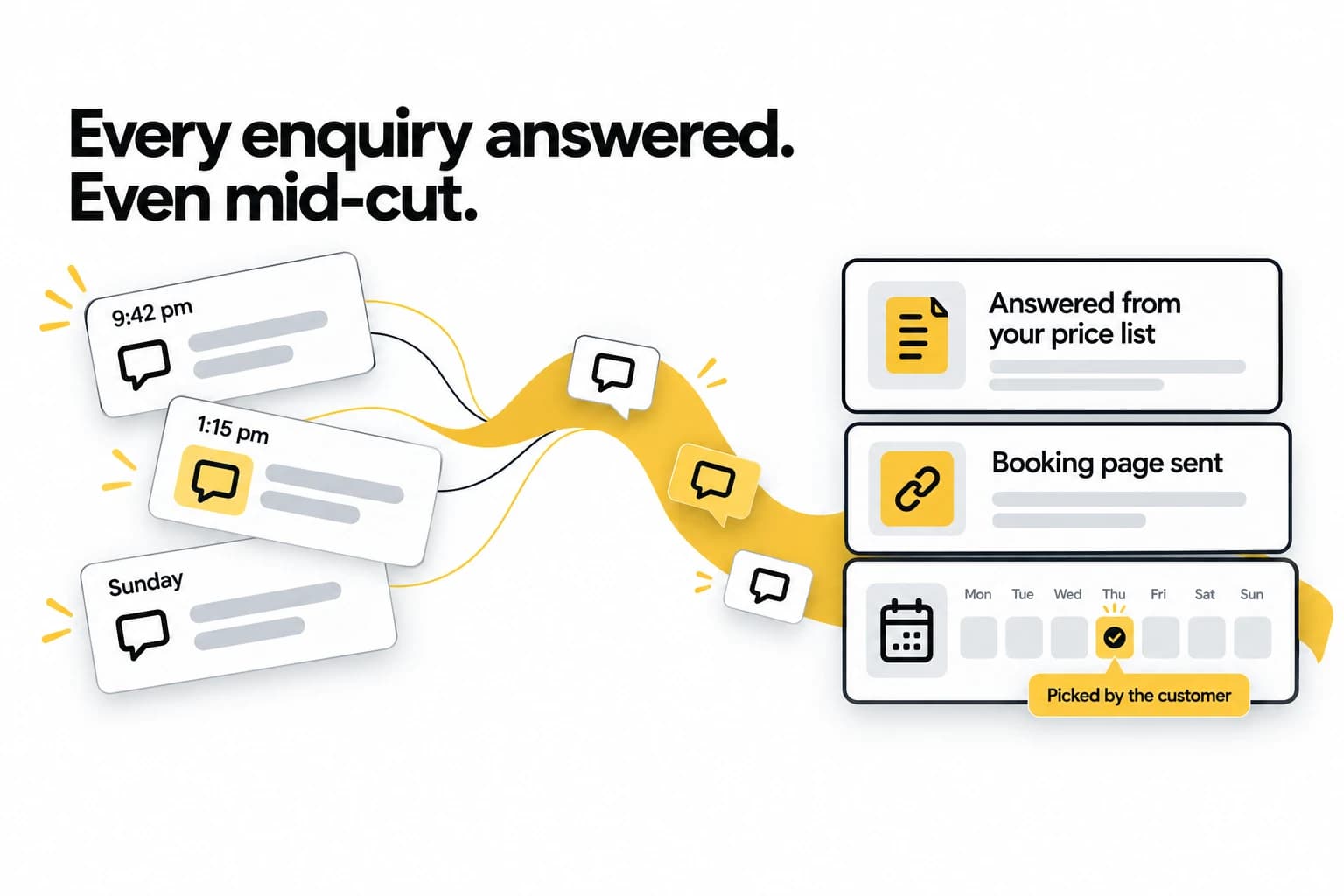
Every salon owner knows the moment. You're halfway through a colour, foils in, and your phone buzzes on the counter. Then again. "How much for a cut and colour?" "Got slot Saturday?" "Where to park ah?"
You can't answer with gloves on. By the time you can, it's an hour later, and a customer who asked three salons the same question has usually booked with whichever one answered first.
WhatsApp automation fixes the waiting, not the welcome. Set up well, it answers the routine questions from your own price list, sends your booking page so the customer picks their own slot, and hands anything that needs a person to your team with the whole chat attached. This guide covers what to automate, how to set it up in five steps, and what a Saturday looks like once it's running.
What "automation" means in this guide: an AI that answers the messages customers send you, from information you give it. It is not a tool for blasting promotions. If you're still deciding whether AI belongs on your WhatsApp at all, we covered that honestly in Can AI Really Handle Your Business WhatsApp?
What to automate, and what to keep
The rule of thumb: automate the questions you answer the same way every time, and keep the ones where the answer depends on judgement.
Let the AI answer:
- Prices, straight from your price list
- Opening hours, including holiday closures once you've added them
- Which services you offer and how long each one takes
- Where you are and where to park
- Whether you take walk-ins
- How to book, by sending your booking page
Keep for your team:
- Reschedules and cancellations
- Complaints, and anyone who sounds upset
- Colour consultations and corrections, where the right answer depends on seeing the hair
- Anything it can't answer from what you've given it
A good setup doesn't guess at the second list. It hands the conversation over, so nobody asks the customer to start again.
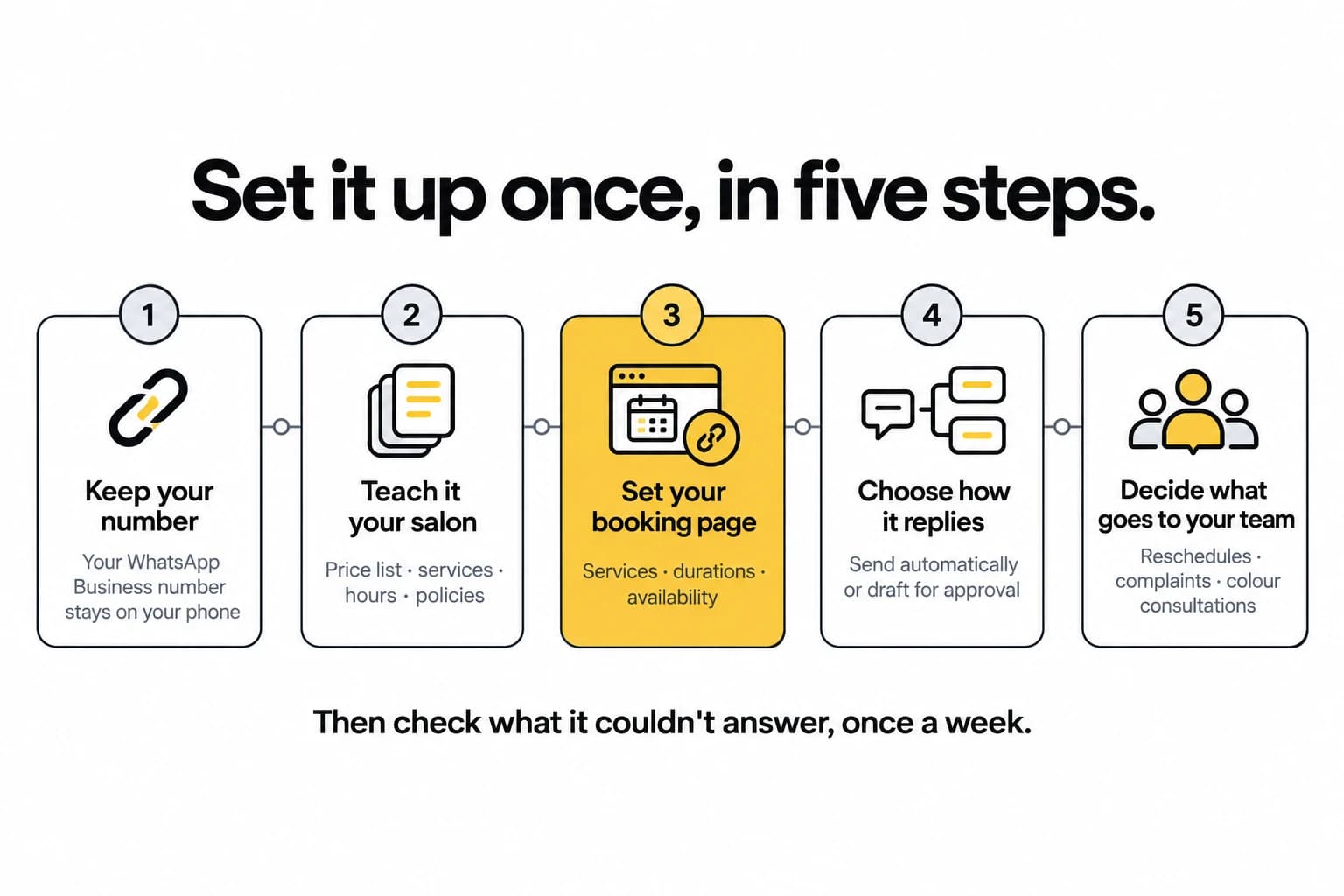
How to set it up
1. Keep your number
Your customers already have your salon's WhatsApp number, so keep it. If it's on the WhatsApp Business app, it stays in the app on your phone and keeps working there while the AI answers alongside you. Meta calls this coexistence, and it needs app version 2.24.17 or newer. If your number is on the regular WhatsApp app, switch it to WhatsApp Business first. The steps are in our guide to connecting your WhatsApp.
2. Teach it your salon
The AI answers from what you give it, not from generic knowledge. Upload your price list, your services menu, your opening hours and your policies on deposits, cancellations and late arrivals, as PDF, Word or text files. Or point it at your website and let it read the pages.
Write policies the way you'd say them at the counter. A one-line rule answers a customer better than a paragraph of terms and conditions.
3. Set your booking page
Tell it what people can book, how long each service takes, and when you're available. That becomes your booking page. When a customer wants to book, the AI sends the page in the chat and they pick a slot that's actually open. The AI never promises a time itself, so it can't offer a slot you've already given away. Each booking arrives as a request for you to accept, or confirms itself if you switch that on, and every booking lands in one calendar.
4. Choose how it replies
There are two modes. Send automatically, and it replies straight away. Draft for approval, and it writes each reply and waits for you to press send. A sensible way to start is with drafts for the first few days: read what it would have said, then switch to automatic once you trust it.
You can pause it at any time, for one conversation, one number or the whole inbox. While it's paused, it still suggests replies.
5. Decide what goes to your team
Decide who on your team picks up what the AI hands over, and make sure your information draws the line where you want it:
- Reschedules. The AI can't move a booking, so these always come to your team.
- Complaints. It hands over as soon as a customer sounds upset, rather than trying to smooth it over itself.
- Colour consultations. If your price list says colour corrections need a consultation first, the AI tells the customer that instead of quoting for one.
Whatever it hands over arrives with the full chat, so whoever picks it up already knows what was said.
Then: check what it couldn't answer, once a week
Every question the AI couldn't answer goes on one list. Once a week, read it and add the answers: a new service, a holiday closure, a change to parking. Next time, it knows. This habit is what turns a decent setup into a good one.
A Saturday with it switched on
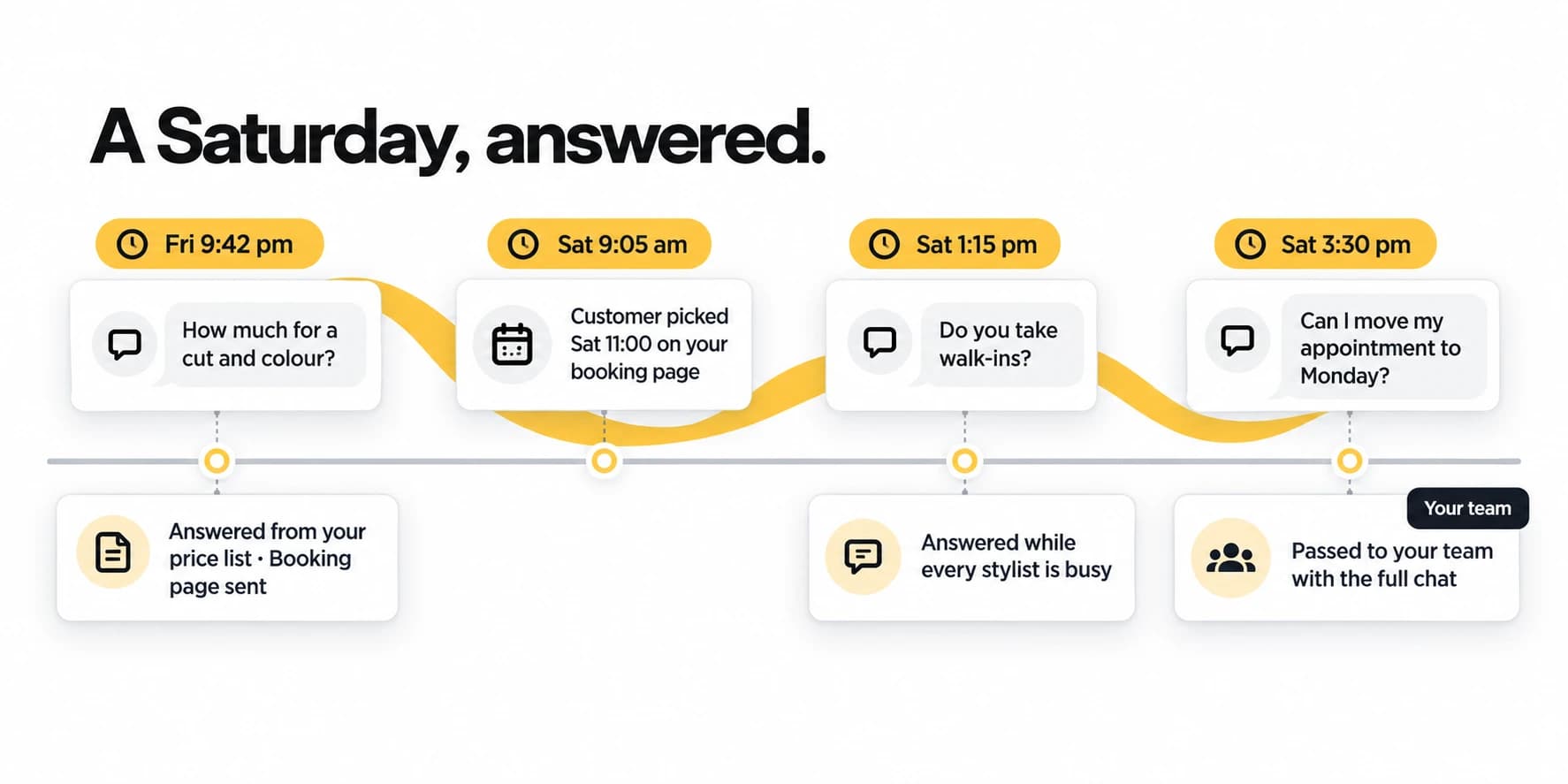
Here's how one ordinary Saturday goes:
- Friday, 9:42 pm. Long after closing, someone asks how much a cut and colour costs. The AI answers from your price list and sends your booking page in the same reply.
- Saturday, 9:05 am. Before you've unlocked the door, they've picked 11:00 on your booking page, and the booking lands in your calendar.
- Saturday, 1:15 pm. Every stylist is mid-appointment when someone asks whether you take walk-ins. The AI answers from your policies.
- Saturday, 3:30 pm. A customer asks to move their appointment to Monday. That's a change to your calendar, so the AI passes it to your team with the full chat, and whoever is free sorts it out.
Nobody put down the scissors for the first three. The fourth reached the person who should handle it, with nothing lost on the way.
Sounding like your salon, in your customers' languages
The AI writes in your tone, from your own words, which is why step 2 matters more than any setting. It also replies in the language the customer writes in: English, Malay, Chinese, Thai or Vietnamese. Malaysian customers rarely stick to one, and they don't need to. "Boleh book Saturday tak?" is understood and answered, because the AI follows a switch even in the middle of a sentence.
If you also run TapBrig's chat on your website, a regular who messages there is recognised as the same customer who usually writes on WhatsApp.
For how this works under the hood, and what to check before you choose a tool, see AI WhatsApp Auto-Reply: How It Works.
What to check after the first month
Three things tell you whether it's working:
- The list of what it couldn't answer. It should be getting shorter. If the same question keeps coming back, the answer belongs in your information.
- The chats that came in after closing. These are the enquiries that used to wait until morning, or went to another salon.
- The bookings that came through your booking page. That's the part of the conversation that used to take several messages and a phone call.
The short version
Automate the questions you answer the same way every time. Keep your number, teach the AI your price list and policies, set your booking page, choose whether it sends or drafts, and decide what your team should take. Then check what it couldn't answer, once a week.
To see how this fits a salon or clinic, read TapBrig for salons and clinics, or see everything the WhatsApp product does. If you'd rather talk it through, send us a note.
See it answer your customers for a week
One AI brain across WhatsApp, web chat and digital name cards — capturing leads and sending your booking page, 24/7. Every feature, 500 AI credits, no credit card.
More from the blog
WhatsApp Chatbot Malaysia: A Buyer's Guide (2026)
On a sales page every WhatsApp chatbot looks the same. These six questions show which ones will serve Malaysian customers well, and what you'll actually pay each month.
ReadWhatsApp Charges for Replies Since 1 October 2026
Replying to customers inside their 24-hour window was free from November 2024 until 1 October 2026. Here's what it costs now — worked through on a real monthly bill — and why one marketing broadcast still costs more than a month of conversations.
ReadWhat Is an AI Customer Engagement Platform? A Plain Guide for SMBs
The term is everywhere and explained nowhere. Here's what an AI customer engagement platform actually is, how it differs from a chatbot or a CRM, and why it matters for a small business.
Read